Custom tools and stamp libraries
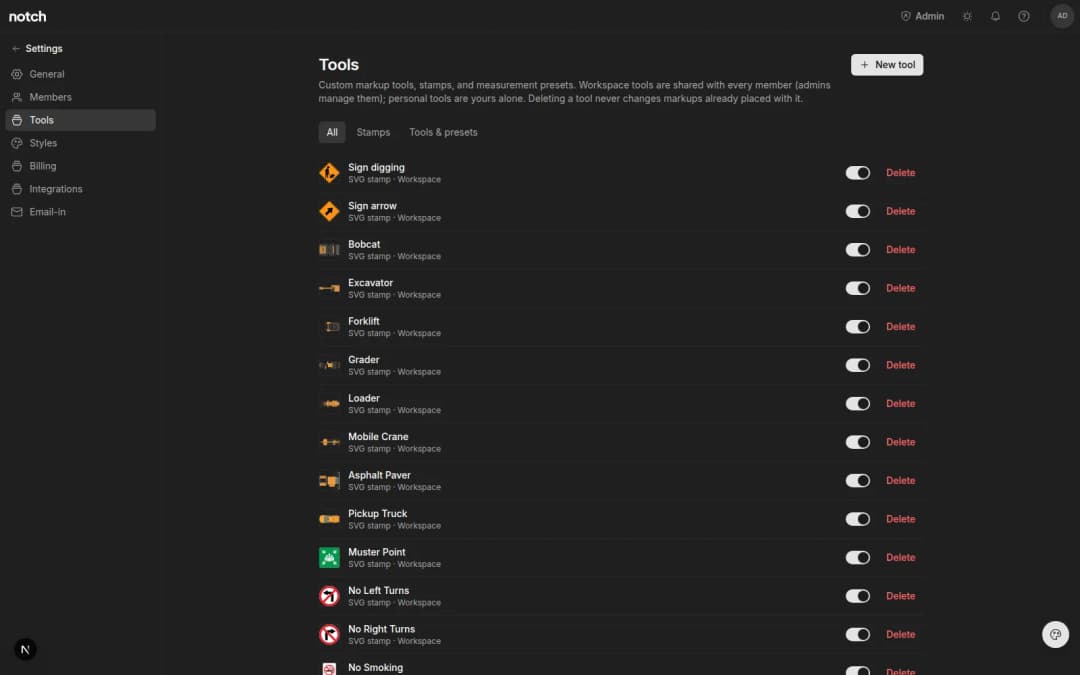
Save any markup or measurement as a reusable tool, upload your own stamps, and share the whole set with your team.
- Written by
- Notch Team
- Published
Any markup or measurement you've styled can now be saved as a tool and used again on the next job. You can upload your own stamps too, and share either with the rest of the workspace.
Save A Markup As A Tool
Get a markup or measurement looking the way you want, then choose Save as tool… in the Properties panel. It lands on your tool rail carrying its full style — colour, stroke, fill, opacity — and, for measurements, your takeoff defaults like cost code and display unit. Saved tools also show up in the ⌘K command palette.
Your Own Stamps
Upload an SVG — a company logo, a review stamp, whatever your office runs on — and place it like the built-in set (APPROVED, FOR REVIEW, NOT FOR CONSTRUCTION and the rest).
Personal Or Shared
Keep a tool to yourself or share it with the workspace so everyone estimates off the same set. Admins manage the shared library. Everything lives under Settings → Tools.
What's Next?
Shareable template libraries. This is the first piece of that, not the whole of it.
Something missing, or something broken? hello@notch.build.
Notch is the modern cloud workspace for construction teams — markup, measure, compare and share, right in the browser. Start for free.
— The Notch Team