Introducing custom fonts in Notch
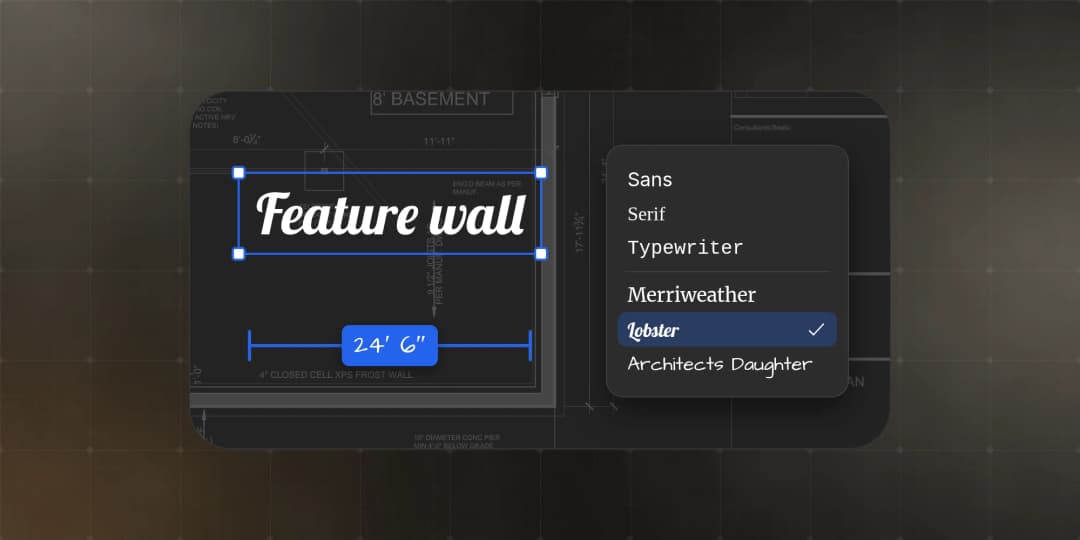
Bring your own typeface to your PDFs. Add any Google font or upload your own, use it on text markups and measurement labels, and it carries through every device and every export.
- Written by
- Notch Team
- Published
Available today for every Notch workspace, on every plan, on the web, iPhone, iPad and Mac.
Today we're introducing custom fonts in Notch. Until now, text markups came in four built-in fonts. Your workspace can now add its own, either from the full Google Fonts library or from your own font files, and use them anywhere you add text to a PDF.
If your team has a brand standard, your markups can now match your title blocks, letterheads and submittals. For everyone else, it's simply more control over how your markups read.
What's New
- Google Fonts, built in. Browse and add any family in the Google Fonts library. Every name is previewed in its own font, and each family comes with all its styles, including bold and italic.
- Your own fonts. Upload
.ttfor.otffiles. In Chrome and Edge you can also pick a font already installed on your computer, and the Mac app can add one straight from your Mac. - A separate label font. Measurement values, name labels and sequence tags can use their own font, set apart from your text markups.
- Workspace defaults. Choose the fonts new markups start in, so the whole team is consistent from the first markup.
Consistent Everywhere
Fonts belong to your workspace, not to anyone's computer. Every member sees the same font on the web, iPhone, iPad and Mac, without installing anything.
When you export, Notch embeds the fonts in the PDF. The document looks the same in Bluebeam, Acrobat or any other PDF viewer, and the text can still be searched and copied.
The same goes for importing. When you import markups from a PDF, Notch matches the fonts they use. If a font isn't in your workspace yet but is on Google Fonts, Notch adds it for you.
Getting Started
- Open Settings → Font settings.
- Click Add from Google Fonts, or Upload fonts to use your own files.
- Optionally, set your workspace's default text and label fonts.
- Select a text markup and choose your font from the font menu.
Availability and Details
- Available now on every plan. Any workspace member can add fonts and set the defaults.
- Markups already in a document keep the font they were created with.
- Font files can be up to 10 MB each. Notch respects font licensing and won't accept a font whose licence doesn't allow embedding.
- Variable fonts and font collections (
.ttc) aren't supported yet. Upload the individual styles instead.
Questions or feedback? hello@notch.build.
Notch is the modern PDF editor for construction teams. Mark up, measure, compare and share, right in the browser. Start for free.
— The Notch Team