Notch is now on iPhone and iPad
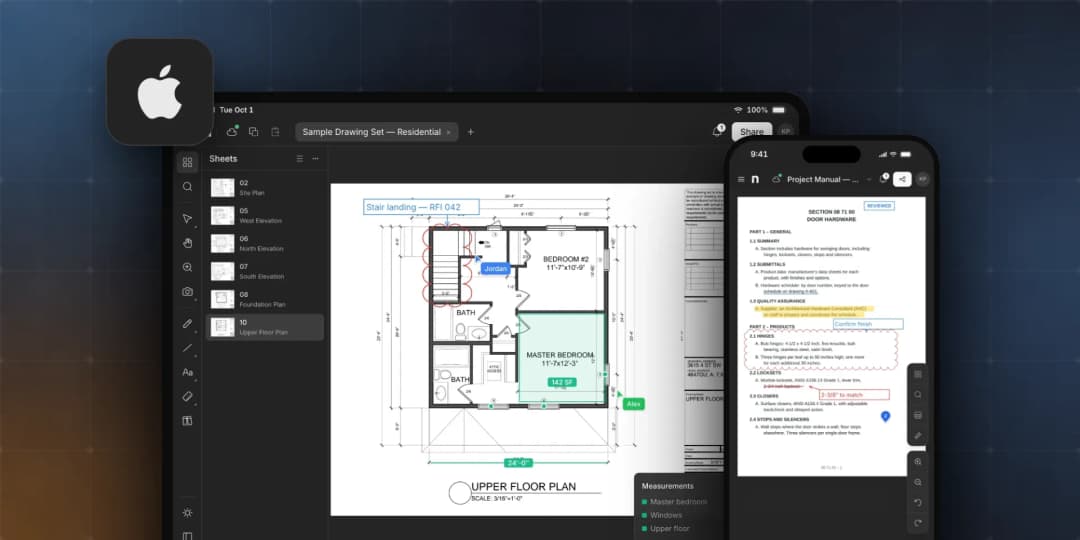
You asked for it on site. Notch is now on the App Store for iPhone and iPad — the full editor, Apple Pencil support and PDFs straight from the Files app.
- Written by
- Notch Team
- Published
Available today Notch is now available on the App Store for iPhone and iPad. Free to download, and it works with your existing Notch account.
Last week we brought Notch to the Mac. Today we're excited to bring it to your mobile devices: Notch is now built for iPhone and iPad.
Your documents don't stay at your desk. They go to the site walk, the coordination meeting, the trailer and the client's office. Now Notch goes with them, as a native app.
Download Notch on the App Store
The Same Notch, Built For iPhone and iPad
One of our biggest issues with competitors' products is that the mobile version is often watered down and incomplete. In building these apps, we've done our best to keep feature parity between desktop and mobile. You're getting the full editing experience, on the same account and the same workspace you already use:
- Markup. Arrows, clouds, shapes, text, stamps and signatures.
- Measure. Set your scale and pull lengths, areas, perimeters and counts straight off the drawing.
- Organize. Insert, split, extract, rotate and reorder pages.
- Compare. Overlay two revisions and see what changed.
- Collaborate. See your teammates' markups as they work, and leave comments right where the problem is.
What You Asked For
- Apple Pencil on iPad. Full Apple Pencil support. Draw and measure with the Pencil while your fingers pan and zoom.
- Touch-friendly on iPad. Larger, more touch-friendly controls throughout the app.
- Made for your phone. We designed the UI to be usable on your phone: a tool strip along the bottom, panels in a drawer, and the drawing full screen. Pull up the latest set, check a dimension, drop a cloud or answer a comment from wherever you're standing.
- Open PDFs from the Files app. Open a PDF from Files, Mail or any other app and mark it up right where it lives.
- Work offline. Choose Keep on this device from a document's menu to take it with you. Anything you change without a connection is saved and syncs when you're back online.
Your Account, Your Plan
Sign in with Apple, Google, Microsoft or email — the same account you use on the web and on your Mac. Your workspace, documents and plan come with you. Nothing to move, nothing to set up twice.
New to Notch? Start on the free plan, or start a 14-day free trial of Solo or Pro right in the app.
Getting Started
- Download Notch from the App Store.
- Sign in with your Notch account, or create one.
- Open a document from your workspace, or open a PDF from the Files app.
Availability and Details
- Requires iOS 17.4 or iPadOS 17.4 or later.
- One download covers iPhone, iPad and Mac.
- Notch on the web isn't going anywhere. Use whichever suits the day — your work is the same everywhere.
What's Next?
As with the Mac app, our plan is to keep enhancing it. We intend to issue weekly updates to help the apps keep pace with our web platform. Expect new releases on a weekly cadence to introduce new features and fix bugs. We also intend to release Windows and Android apps once we feel these platforms are stable.
A Very Special Thank You
Over the last two months we've had overwhelmingly positive feedback on Notch. Two apps in one week — and both exist because you kept asking for them. Keep the feedback coming — tell us what's working, what isn't, and what you want next. We read every message, and the roadmap is shaped by what you send us.
Questions or feedback? hello@notch.build.
Notch is the modern PDF editor for construction teams. Mark up, measure, compare and share — in the browser, on your Mac, iPhone and iPad. Start for free.
— The Notch Team