Full undo, redo, and edit history
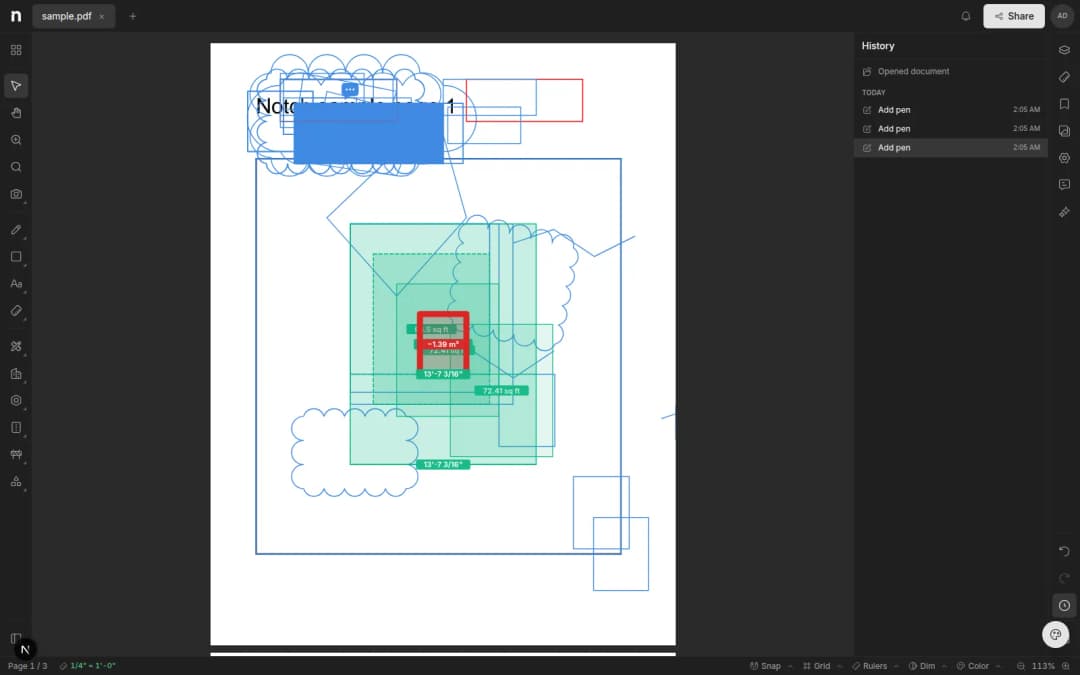
Undo and redo across every markup and measurement, plus a History panel that remembers every step — even after you close the tab.
- Written by
- Notch Team
- Published
Undo was the most common request we heard during launch. It's now in the editor, along with redo and a history you can scroll back through.
Undo And Redo, Everywhere
Every edit is undoable. ⌘Z steps back and ⇧⌘Z steps forward, across markups, measurements, moves, resizes, text edits and deletes. If you moved a dozen objects at once, one undo puts them all back.
A History You Can See
The right sidebar has a History panel listing what you've done — "Add distance (12 ft)", "Move rectangle", "Delete callout". Click any line to send the drawing back to that point.
It Survives A Reload
Your history is saved with the document, not held in the tab. Close it, come back tomorrow, and you can still undo into yesterday's work.
What's Next?
More editor quality-of-life, weekly. Tell us what's missing.
Something missing, or something broken? hello@notch.build.
Notch is the modern cloud workspace for construction teams — markup, measure, compare and share, right in the browser. Start for free.
— The Notch Team